

How would you like a DSP speaker management processor ~and~ digital mixer for less than the price of a low-end speaker processor like a DBX DriveRack? A LOT less… Like $25? 😲
These Biamp Nexia SP DSP Speaker processors from circa 2008 are cheap and plentiful on the used market. Very high quality and built to last. I got two for $50 on Craigslist! Normally, they’re used in big distributed audio systems, like in conference centers, concert venues, sports arenas, and churches. The Nexia SP Speaker processor is just one part of a whole ecosystem of networked teleconferencing, video conferencing, and distributed audio products.

But they’re great for pro audio applications as well! They just don’t happen to have any XLR connectors. It’s all terminal blocks, as is common in large installed commercial systems. But you can add XLR connections on a patch panel. (Or RCA jacks for a home system. See here for Biamp’s wiring diagrams for unbalanced connections. )
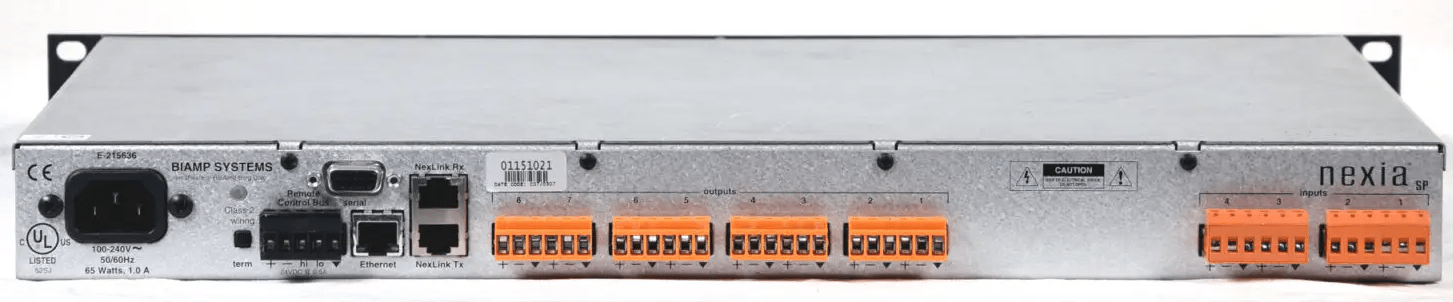
The Nexia SP has 4 inputs and 8 outputs. Perfect for two stereo inputs, and outputs for multi-way speakers with subwoofers.
Want more I/O? You can link them with standard network cables. I have two units linked for 8 inputs and 16 outputs. This gives me four stereo inputs, and outputs for main speakers, subwoofers, guest subwoofer, stereo monitor, mono monitor, aux full-range feed, and pre-fade recording output, with 3 outputs to spare!
But you need XLR connnections for pro audio systems, so you can build your own patch panel, like this.
Yes, there are commercially available terminal block to XLR dongles, but I don’t recommend them. Besides being expensive, they’re not very robust. Wires going into terminal blocks should not be allowed to wiggle, or they will break from stress fractures, and these dongles don’t have very good strain relief.
Making the XLR-to-terminal-block pigtails is a lot of repetitive work! But very satisfying.

A simple strain relief for panel-mount XLRs: A 50mm long M3 bolt attaches one side of the XLR panel connector. Two zip-ties secure the wire to the bolt. If you wiggle the cable, there is no motion at the solder terminals, and it will not suffer metal fatigue fractures.

The cables are plugged in to the Nexia units, and a copious number of zip-ties are deployed, to clump everything together so that the wires do not move, and break from stress.
Note the yellow Cat5E “Nexlink” cables that connect the two units so they can share audio. Shielded Cat5E is manufacturer recommended to connect the digital grounds together tightly, and to minimize transmitted interference.

A $6.00 thrift-store router is added to the rack, which allows wireless DSP configuration, and live system control and monitoring. This happens to be a Netgear router, but it could be literally any router. It does not connect to the internet. Small is good. I put the router’s internal antenna towards the outside of the case, and the range is plenty fine.
A laptop computer runs “Biamp DaVinci”, a custom control-surface interface software.

Ta-da!


Except… DON’T DO THIS! 😹 Do not mount a 38-pound Crown K2 in the same rack as all this stuff! The rack turned out to be 95 pounds. 🙃 Oops!😹 I’ve since put the K2 in its own rack. 😸
(Side note: I recently refurbished this K2. All new caps and addressed some known issues. What a great subwoofer amp!! Basically infinite power as far as my JBL STX818 is concerned.)
The configuration software:
The Nexia app is all open-architecture, DSP block type configuration. Wire anything to anything, in any order. There is a bit of a learning curve, in regards to networking, initializing units and transferring configs to them. It helps to be familiar with basic TCP/IP networking. If you’ve ever configured enterprise network routers, you’ll find this simple in comparison. 😹
It’s SO COOL what you can do with this. Here is my humble config.
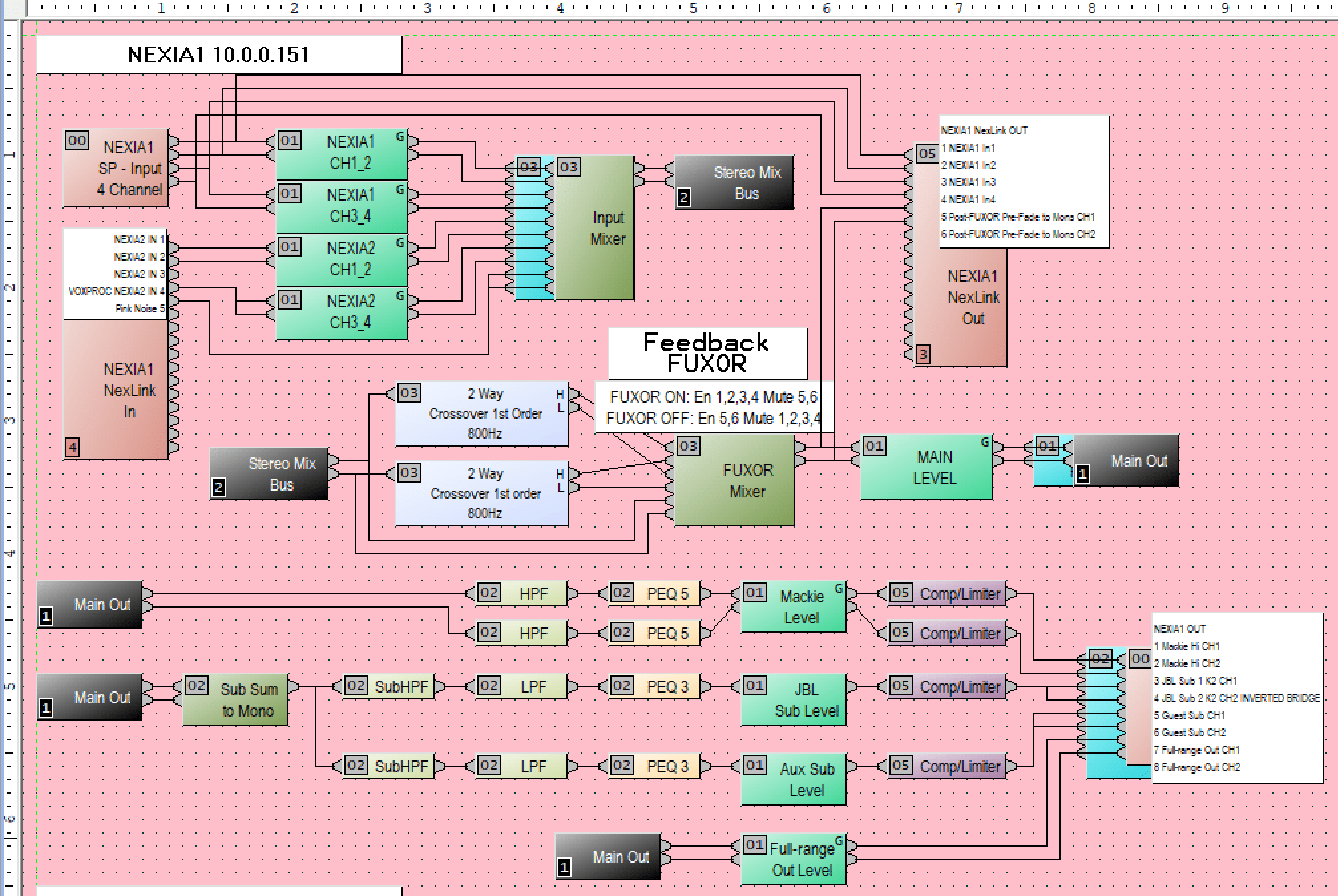
Basically, if you are using it as a speaker-processor, the blocks go in the same order as they would on any speaker processor. It’s also laid out a lot like any audio mixer. Mine goes Inputs > Level Trim > Mix to main bus > Main Level > Crossover > EQ > Output Trim > Limiter > Output.
The quality of the processing is amazing. You get lots of options in the DSP modules. Like this full-featured compressor for example. Most lower-end speaker processors like the DBX DriveRack PA2, do not allow you to change the attack and release times, which I find essential for subwoofer limiting, to prevent over-excursion. (Higher-end DBX units like the Venu360 do allow you to change attack, hold and release times.)
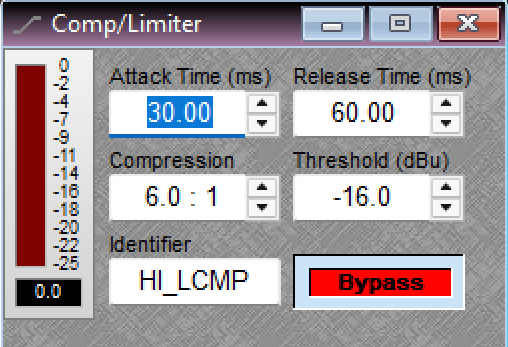
It lacks an “over-easy” or “soft-knee” option, but you can chain two compressors in series for a similar, perhaps even better effect! Set the first compressor with a medium ratio like 4:1, and set the second one to a higher ratio and higher threshold than the first one. Compress, then limit.
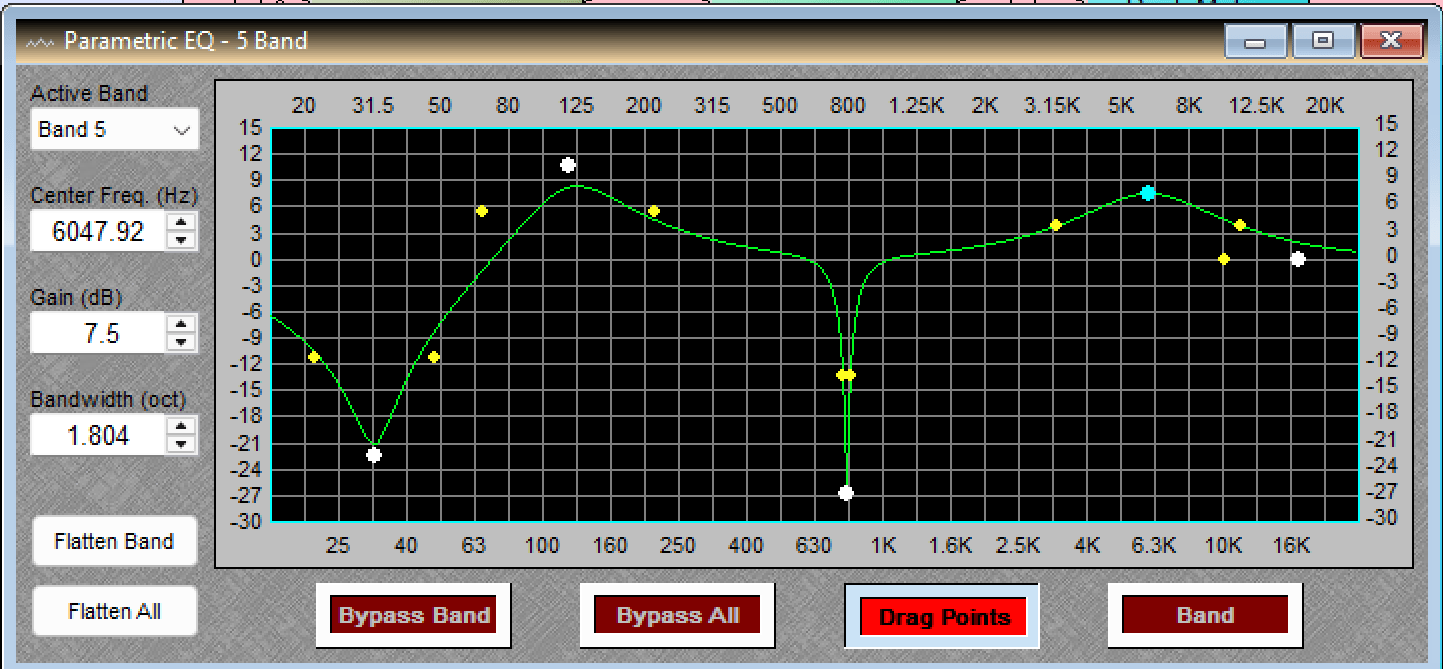
Here’s the Parametric EQ. (Just a bunch of random settings shown.)
More cool blocks:
- Matrix mixers to send different levels to zones, with delay
- Auto mixers
- Routers
- Feedback Suppressor
- Crossovers
- All-Pass filters (Correct phase issues the old-fashioned way.)
- Automatic Noise Control
- Ducker
- Leveler
- Noise Gate
- Delays up to 2sec
- Meters
- Tone generator, pink and white noise
- Transfer Function
What you don’t get with this older platform DSP versus new stuff:
- No FIR DSP, so no zero-phase filters or any such time-domain sorcery.
- No Auto-EQ or time alignment
- No high-bitrate DACs and ADCs. 96K sample rate is becoming commonplace now, and the Nexia is 48K. This is absolutely fine for my application, pro audio sound systems. Home audiophiles may prefer more samples.
- No RTA, and no RTA display backgrounds in the equalizer, compressor and other DSP blocks
- No dynamic EQ
- It does not speak Dante, AES50, or other common IP audio protocols. It uses its own, proprietary NexLink protocol, used only for sending audio among Nexia units, for short distances. The Biamp Audia units do speak CobraNet though.
- No digital audio I/O
- Interface is a bit dated, yet charming and effective.
Did I mention it’s $25? 😸 A brand new lower-end speaker processor isn’t nearly so capable.
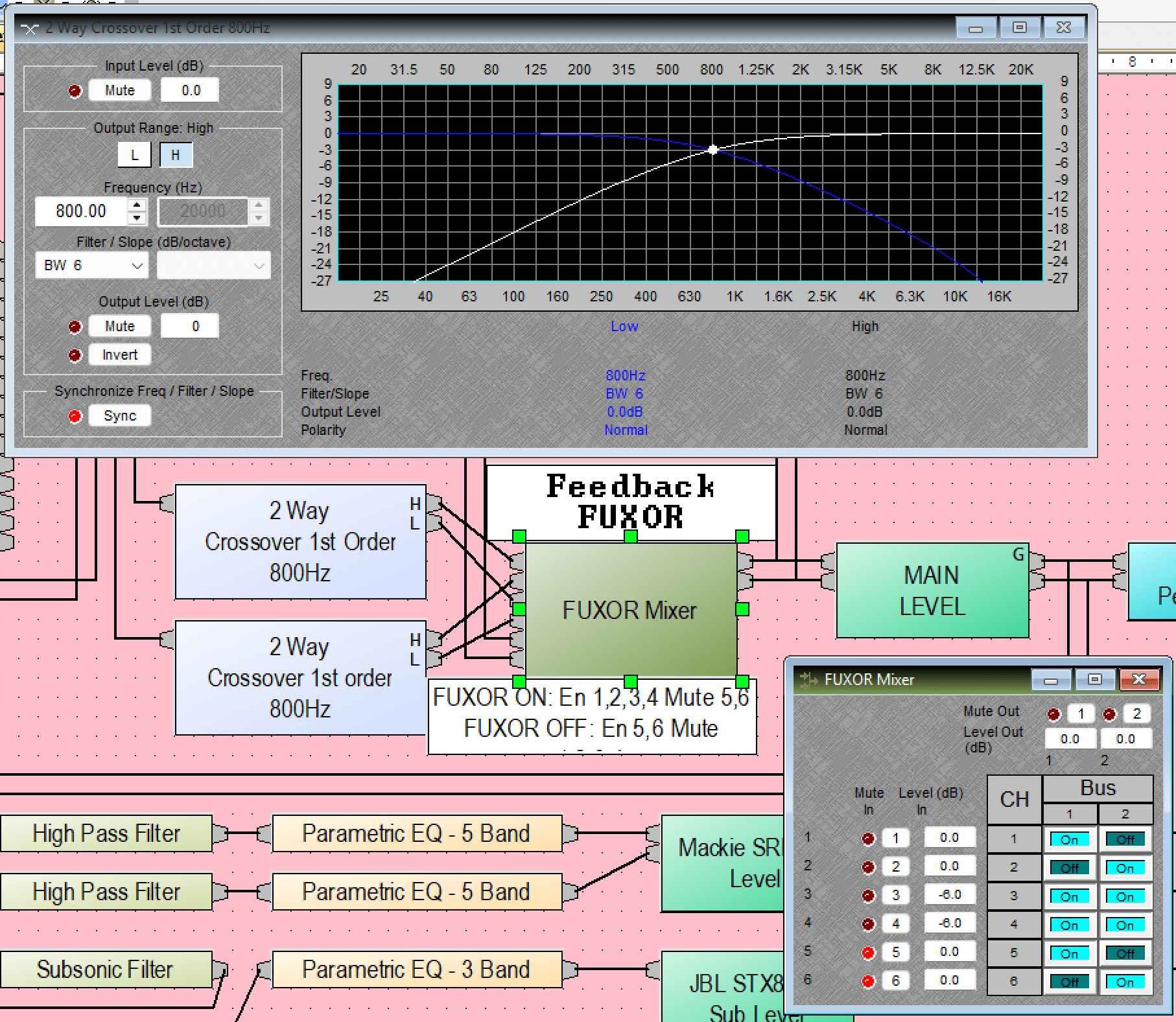
Sidebar: WTF is a “Feedback FUXOR”? 😸
It’s a good example of the things you can build with open-architecture DSP!
I do live sound for bass-heavy electronic music played on turntables. Feedback is a huge problem because of the subwoofers, which shake the hell out of the table!
The Feedback FUXOR is a DSP implementation of an old feedback reduction technique.
LPs are encoded in such a way that all the stereo information is contained in the vertical deflection of the stylus. Stereo is in the hills and dales! If there is a mono signal, equal in both channels, the stylus will only waggle side-to-side. Bass on LPs is typically mixed mono, and should only cause side-to-side waggling. Too much stereo bass causes the needle to jump out of the groove, and skip, so best practice has always been to mix the bass in mono.
Turntable feedback mostly originates from vertical stylus deflection caused by the table vibrating up and down, and the record itself vibrating up and down, as it picks up sound from the air, like a microphone. The Feedback FUXOR ignores vertical stylus movement below 800Hz. (-3db point 1st order)
How it’s done: A 1st-order crossover splits the audio into high and low bands, with minimal phase rotation in the crossover region. The highs are passed directly to left and right, and the bass is summed, and added back to both channels. Note there is a -6db pad on the summed channels, because the mono summing causes two copies of a doubled signal to be created. This results in a flat frequency response for equal mono signals.
All vertical stylus movement in the bass region, is thus ignored. This includes table vibration from subwoofers, footfalls, and needle drops.
This is not a new technique. There are a few phono preamps that do similar, achieving the summing by different methods, like mid-side extraction. The designs I’ve seen sum the bass at a much lower frequency, around 80-200Hz, and with a steeper slope, which makes for more phase rotation. This is IMO a major drawback to these feedback-cancelling schemes. There is already a lot of phase rotation going on in an RIAA preamp, even more in the speaker crossover, and adding yet more rotation with another steep crossover seems like a bad idea.
How about a 1st order filter with minimal phase shift, instead? Sure, it will be killing the stereo up into the lower mid-range frequencies, but is this really a problem?
I wanted to know how high in frequency I could go without affecting the stereo image. Through experimentation with music files in Audacity, summing the bass at various slopes and frequencies, and listening to the results on my home stereo, and headphones, I realized that there is little need to preserve stereo information below about 800Hz, at a gentle 6db/oct slope. This has surprisingly little effect on the stereo image! Almost all the stereo imaging information exists in the upper octaves.
How well does the Feedback Fuxor work? I don’t have any actual measured data yet, and have only used it at one show, but it worked great! Very tight, clean bass from the turntables. I got a lot of compliments on the sound!
The Control Surface Software:
It’s called Biamp DaVinci, and it allows you to create a custom control surface with all the sliders and meters you want. It works with touch screens. It’s super easy to configure; you just copy and paste items from the Nexia config app to the DaVinci app.
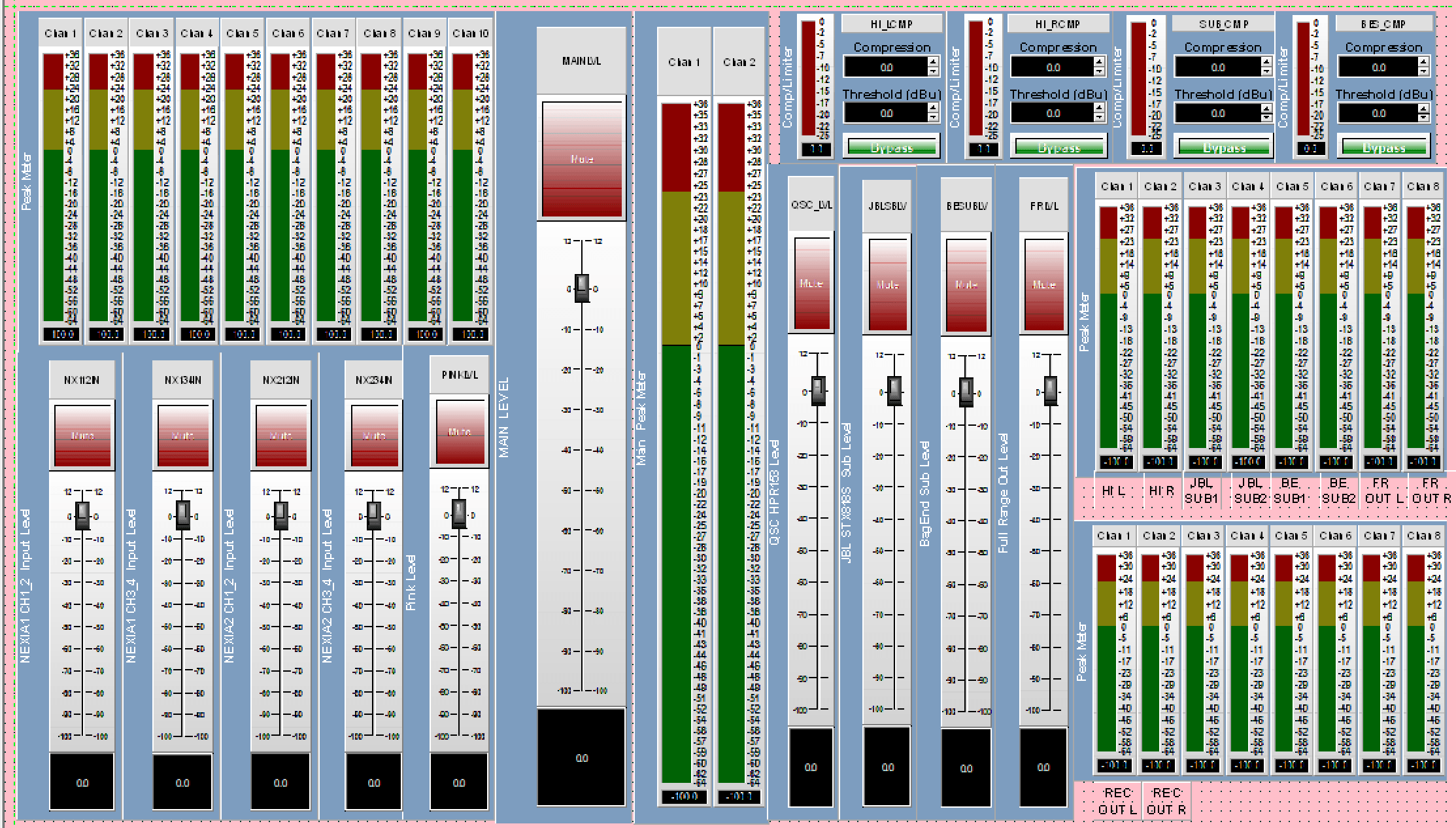
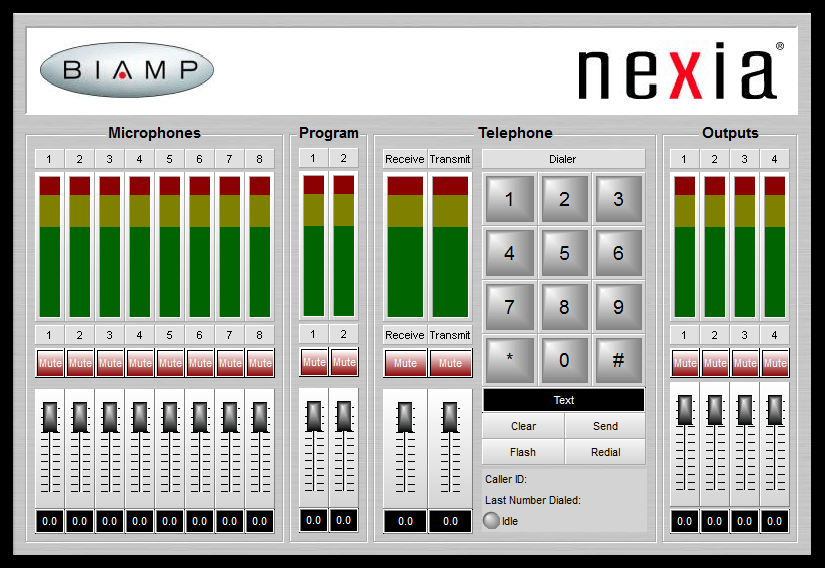
It’s possible to add pictures and make everything look nice, like in this example from Biamp. Mine is pretty rough. 😸
CAVEATS:
These things are kinda old. 2008 was 18 years ago! But they are very well made. There is one known issue, and that is power supplies. Capacitor problems of course! Not all units are affected.
Here’s a snap from a service bulletin from Biamp.

Both my units appear to have the “good” capacitor, which is a Nichicon GU series. Indeed a good quality capacitor, it tests fine.

But it made me paranoid that I could have a failure in the field, and power supplies are a very common culprit, so I decided to re-cap the power supply, even though it’s working fine. A simple job; only 10 capacitors. Panasonic FR caps will make this switching supply very happy.
And I’m glad I did re-cap it! In the process, I found two NIC NRSZ caps that had leaked, just very slightly, yet they still tested good. Murphy’s law suggests these caps would fail when I am in the middle of the best DJ set of my life. 😹
Parts:
There are only three types of caps needed. All these exceed original spec in ESR, ripple and lifetime. About $20 in parts.
- (1) Main filter cap. 220uF/400V Epcos/TDK B43547 (Original is 420V, an odd value. 400V rating is plenty, it sees maximum 354V on a 250VAC supply.)
https://www.digikey.com/en/products/detail/tdk/B43547C9227M060/4944378 - (5) 560uF/35V Panasonic FR
https://www.digikey.com/en/products/detail/panasonic-industry/EEU-FR1V561/2433576 - (4) 47uF/63V Panasonic FR
https://www.digikey.com/en/products/detail/panasonic-industry/EEU-FR1J470/3072280
The re-capped power supply.

This is a really nice quality Alps power supply. 2-layer, gold-plated PCB. Pretty low noise. I observed less than 60MV P-P ripple, in operation, on all the rails.
I spot-checked about half of the smaller electrolytic SMD caps on the main board and they all tested good! One person on a forum said they have seen bad caps on the DC-blockers on the inputs, on units that have been powered on for a long time. I can tell my particular units have very low hours on them, judging by the lack of dust on the fans and circuit boards. These caps test perfectly fine, so I’m going to leave them, and maybe check again in a few years.
More pictures:
Nice, eh? Sharc DSPs, Burr-Brown PCM 1738 DACs. Everything is top-shelf, no cheap parts. Gold-plated board. Nice, logical layout with functional block labeling. Clearly labeled test points.


Other Models:
Also interesting, is the Audia lineup. Essentially the same architecture as Nexia. The Audia Flex is particularly interesting, as it uses plug-in cards for its 24 I/O ports, and any port can be either an input or output! It also speaks CobraNet, if you need remote audio that connects with other brands of gear. These units are available used for under $100. Buy two units and you’ll have all the cards you need, with spares.


Conclusion:
If you like to build things, and tinkering with open-architecture DSP blocks is your idea of fun, then never mind the cheap speaker management processors and get this!